Product Installation: Blüthner Digital Model One Installation Notes
If you have the screen shot below then you have the original version and do need to upgrade to version 1.1
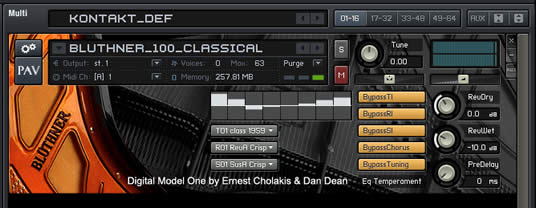
This is a screenshot of the version 1.1 interface:
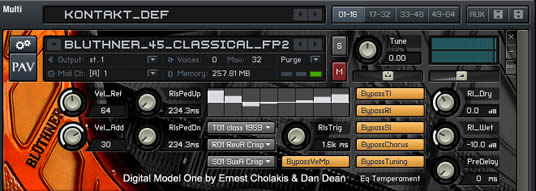
Typically on a Mac the files should be in a folder Application/Kontakt 2 Library/Bluthner Digital Model One but in the original install you can specify an external hard drive location for the BDMO files. If you do not know where the BDMO files are do a search for one of the files listed below
The following files with sizes should be in the folder
- Bluthner Model One_001.nkc 80KB
- Bluthner Model One_001.nkx 1.98 GB
- Bluthner Model One_002.nkc 64KB
- Bluthner Model One_002.nkx 1.98 GB
- Bluthner Model One_003.nkc 12 KB
- Bluthner Model One_003.nkx 127.2 MB
- Bluthner Model One_1_1.nkc 60 KB
- Bluthner Model One_1_1.nkx 1.44 GB
- Bluthner Model One_info.nkc 4 KB
- Bluthner Model One_info.nkx 804 KB
In the Documentation folder:
- BDMO Manual.pdf 18.6 Mb
- BDMO KP2 Manual.pdf 3 MB
In the Instruments Folder RegularSustainPedal
- Bluthner_100_Classical_fp2.nki
- Bluthner_100_Custom_fp2.nki
- Bluthner_100_Jazz_fp2.nki
- Bluthner_100_Pianos_fp2.nki
- Bluthner_100_Pop_fp2.nki
- Bluthner_100_R&B_fp2.nki
- Bluthner_100_Vocal_fp2.nki
- Bluthner_45_Classical_fp2.nki
- Bluthner_45_Custom_fp2.nki
- Bluthner_45_Jazz_fp2.nki
- Bluthner_45_Pianos_fp2.nki
- Bluthner_45_Pop_fp2.nki
- Bluthner_45_R&B_fp2.nki
- Bluthner_45_Vocals_fp2.nki
- Bluthner_55_Classical_fp2.nki
- Bluthner_55_Custom_fp2.nki
- Bluthner_55_Jazz_fp2.nki
- Bluthner_55_Pianos_fp2.nki
- Bluthner_55_Pop_fp2.nki
- Bluthner_55_R&B_fp2.nki
- Bluthner_55_Vocal_fp2.nki
- Bluthner_65_Classical_fp2.nki
- Bluthner_65_Custom_fp2.nki
- Bluthner_65_Jazz_fp2.nki
- Bluthner_65_Pianos_fp2.nki
- Bluthner_65_Pop_fp2.nki
- Bluthner_65_R&B_fp2.nki
- Bluthner_65_Vocal_fp2.nki
- Bluthner_75_Classical_fp2.nki
- Bluthner_75_Custom_fp2.nki
- Bluthner_75_Jazz_fp2.nki
- Bluthner_75_Pianos_fp2.nki
- Bluthner_75_Pop_fp2.nki
- Bluthner_75_R&B_fp2.nki
- Bluthner_75_Vocal_fp2.nki
- Bluthner_85_Classical_fp2.nki
- Bluthner_85_Custom_fp2.nki
- Bluthner_85_Jazz_fp2.nki
- Bluthner_85_Pianos_fp2.nki
- Bluthner_85_Pop_fp2.nki
- Bluthner_85_R&B_fp2.nki
- Bluthner_85_Vocal_fp2.nki
VariableSustainPedal
- Bluthner_100_Classical_vp2.nki
- Bluthner_100_Custom_vp2.nki
- Bluthner_100_Jazz_vp2.nki
- Bluthner_100_Pianos_vp2.nki
- Bluthner_100_Pop_vp2.nki
- Bluthner_100_R&B_vp2.nki
- Bluthner_100_Vocal_vp2.nki
- Bluthner_45_Classical_vp2.nki
- Bluthner_45_Custom_vp2.nki
- Bluthner_45_Jazz_vp2.nki
- Bluthner_45_Pianos_vp2.nki
- Bluthner_45_Pop_vp2.nki
- Bluthner_45_R&B_vp2.nki
- Bluthner_45_Vocals_vp2.nki
- Bluthner_55_Classical_vp2.nki
- Bluthner_55_Custom_vp2.nki
- Bluthner_55_Jazz_vp2.nki
- Bluthner_55_Pianos_vp2.nki
- Bluthner_55_Pop_vp2.nki
- Bluthner_55_R&B_vp2.nki
- Bluthner_55_Vocal_vp2.nki
- Bluthner_65_Classical_vp2.nki
- Bluthner_65_Custom_vp2.nki
- Bluthner_65_Jazz_vp2.nki
- Bluthner_65_Pianos_vp2.nki
- Bluthner_65_Pop_vp2.nki
- Bluthner_65_R&B_vp2.nki
- Bluthner_75_Classical_vp2.nki
- Bluthner_75_Custom_vp2.nki
- Bluthner_75_Jazz_vp2.nki
- Bluthner_75_Pianos_vp2.nki
- Bluthner_75_Pop_vp2.nki
- Bluthner_75_R&B_vp2.nki
- Bluthner_75_Vocal_vp2.nki
- Bluthner_85_Classical_vp2.nki
- Bluthner_85_Custom_vp2.nki
- Bluthner_85_Jazz_vp2.nki
- Bluthner_85_Pianos_vp2.nki
- Bluthner_85_Pop_vp2.nki
- Bluthner_85_R&B_vp2.nki
- Bluthner_85_Vocal_vp2.nki
Installing BDMO on a Mac
If you are installing BDMO on a Mac with Leopard you must do the following:
- Put the BDMO DVD in your DVD slot inside the Mac, so that is shows up in finder (but do not run it).
- Download and unzip the patch (download the patch)
- Run the app, and it will ask for the location of the BDMO DVD. Once you point to the BDMO DVD, the installer will run properly
After the installer program is finished You will have to copy these three files (Bluthner Model One_001.nkx, Bluthner Model One_002.nkx, and Bluthner Model One_003.nkx) from the DVD disc into the folder. The folder can be set by the user but a default is Applications/Bluthner Model One/ folder or Applications/Kontakt 2 Library/Bluthner Model One/ folder. If you have selected an external drive then they have to also be moved these file manually into that folder.
The next step is to install the update disc (version 1.1). After the installation is complete select the file Bluthner Model One_1_1.nkx from the DVD update disc and copy it to the Application/Kontakt 2 Library/Bluthner Digital Model One folder.
Re-Installing BDMO on a Mac
If you want to re-install BDMO on a Mac, you must first uninstall it. Complete instructions to uninstall BDMO.
Install time
It takes a little while to install BDMO. The size of this library is approximately 4.2 GB, which must be read from the DVD and copied to your drive.
- On a PC (2.4Ghz P4, 2 GB DDR RAM, SATA 1 Drive) the installation process took 12:53 from the start of the install to the Service Center prompt.
- On a MAC G5 dual 2.5Ghz, 4 GB RAM, SATA 1 Drives) the installation process took 9:24 from the start of the install to the Service Center prompt.
When installing on the PC, the installer shows a little icon with animated pages moving from the disk icon to the computer. This gives you a sense that files are still being copied, and that you need to wait until the process has completed.
When installing on the MAC, the installer shows a typical MAC aqua progress bar. You’ll see the progress bar move relatively quickly with files copied being shown, then the wait and possible confusion will begin. At this point the installer will display the word “Copying…”. The progress bar will stop moving and you’ll see no more file names being copied. You’ll ask, “Did this just crash?” You’ll probably think about ending the installer process. Well, don’t. This is the point in the install where the installer is copying 2.5GB of sound files. Also, although our test computers from which the above data were taken were relatively fast machines, you might have a slower computer. This will probably increase the install time.
Installing BDMO on a Mac running Leopard
This is the installer log from a user installing the BDMO on a Leopard Mac - this may help other Mac Leopard users who are having installer problems.
- Clean install of Leopard on Macpro quadcore (8Gb ram).
- Install from original v1.0 disk using the Leopard patch.
- Kontakt Player and Service Centre installed and run, but although Service Centre initially shows BDMO authorised the player does not see the authorisation and subsequently returning to Service Centre now shows BDMO as unauthorised.
- Complete uninstall of BDMO, Kontakt Player and Service Centre.
- Update of Kontakt Player and Service Centre (to v 2.2.24) followed by reinstallation of (patched) BDMO v1.0.
- Authorisation successful, but no .nkx files have been installed. Rerun installer but still refuses to install .nkx files.
- Manual copying of .nkx files to BDMO folder from install disk.
Kontakt 2 Player
The KONTAKT2 Player included on this DVD for the MAC runs on OS X 10.4+ and is MacTel compatible.
You do not need to purchase Kontakt2 to run the BDMO. Everything to run the program is included on your installation disk. You can use the KONTAKT2 Player either as a stand-alone application or as a plug in from within your host sequencer. KONTAKT2 Player will work as a Dxi, RTAS or VSTi plug in as well as a stand alone application. This means, you can use it in Cubase, Digital Performer, Logic, Cakewalk, ProTools – even GarageBand.
Copy Protection
The Blüthner Digital Model One uses a new copy protection feature requiring you to register the program BEFORE you can use it. Follow the directions in the installer and open the Service Center application to register your BDMO. There is no 30 day demo period for the BDMO.
One install per license
The other feature that is different from previous versions of KONTAKT2 instruments is that there is only one install per license. If you wish to have more than 1 install, you will need to contact us.
SATA for improved streaming
We have found that using fast drives (like a SATA1 or SATA2) improves disk streaming significantly. If you are thinking about replacing a drive or just want better performance, using a SATA drive will make your KONTAKT2 Player experience more gratifying.
Stand-Alone Mode
Some users have reported problems in trying to play the BDMO in stand alone mode. BDMO will operate perfectly as a plug in within a host sequencer application, but MIDI is not available in stand alone mode. They report that clicking the little keyboard icons on the screen inside BDMO will play the instrument, but MIDI is inoperational. If you are experiencing this, check the following:
- Look at the MIDI channel assignment in the KONTAKT2 Player. Make sure you have the MIDI receive channel assignment set to the channel you are sending on.
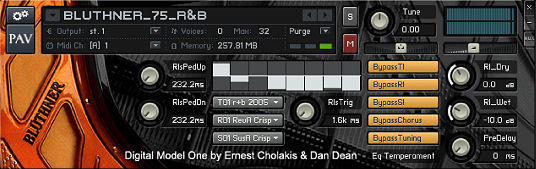
- Also, notice that there are more than one MIDI port selections to choose from. Make sure the correct one is chosen. If you don’t know the correct one, try them all (Port A, Port B, Port C and Port D).
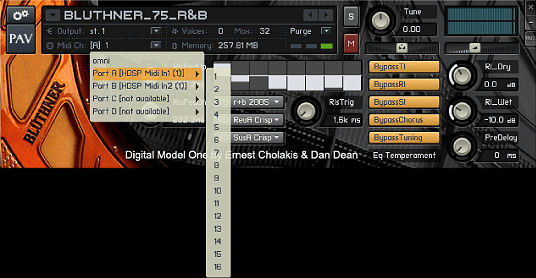
- If you set the MIDI receive to OMNI, you’ll most likely hear what you’re playing on your MIDI device. If you hear sound on this setting, you are probably connected - you will just be able to play one instrument, not many instruments of a multi-channel setup.
If you’re still not hearing anything, check your “Apple Audio MIDI Setup”. It is that little keyboard icon that sometimes lives in your dock. Open it and see what the state of affairs is. If nothing is connected, power up your MIDI interface or reload your settings. Things should be connected and the interface icons should not be grayed out. Once this is normal, try running BDMO/KONTAKT2 Player again.
When all else fails, power down and restart. Sometimes a bit goes awry, things become stuck and you just need to start fresh.
Answers to common problems
BDMO doesn't play on my machine
- When you first install BDMO onto your Windows or Mac machine, you need to choose your audio devices under Audio/MIDI from the menu in the top left corner of your screen. You also need to set your MIDI settings here.
The Bluthner was working perfectly but doesn't now after I installed another Kontakt 2 Player Instrument"
- This one was baffling until I figured it out. Kontakt 2 Player instruments are all built at different times by different manufacturers. If you install the BDMO and then install another K2 Player instrument that was built at an EARLIER time (with a different player revision), the Kontakt 2 Player Installer will install an OLDER version of the player with the most recent install. This can be a problem, and will render your K2P instruments developed later, useless. There are two fixes for this: either reinstall the "later" libraries again, or go to Service Center and download the latest version of the player. This should fix the problem.
If, after all of this you’re still having problems - contact us.
Recommended Variable Sustain Pedal
We both use the CME GPP3 Variable sustain pedal. It is of very high quality and works extremely well with the variable sustain pedal patches on the BDMO. You can "dig" into the pedal for additional sustain.
|